Give Your Customers
Direct
Access To Their Business With You
Empower customers to place orders, track payments, access invoices, and view their account information anytime — powered directly by live Tally data.

Too Many Questions.
Too Many Calls.
Most businesses spend hours every week answering routine customer enquiries that could be available instantly.
What If Your Customers Never Had To Call For Routine Information Again?
Imagine a completely frictionless operation where customer questions resolve themselves instantly, and orders write directly into Tally without a single email or phone call.
Everything Customers Need In One Place
A clean, intuitive self-service portal giving clients full operational autonomy while preserving absolute security.
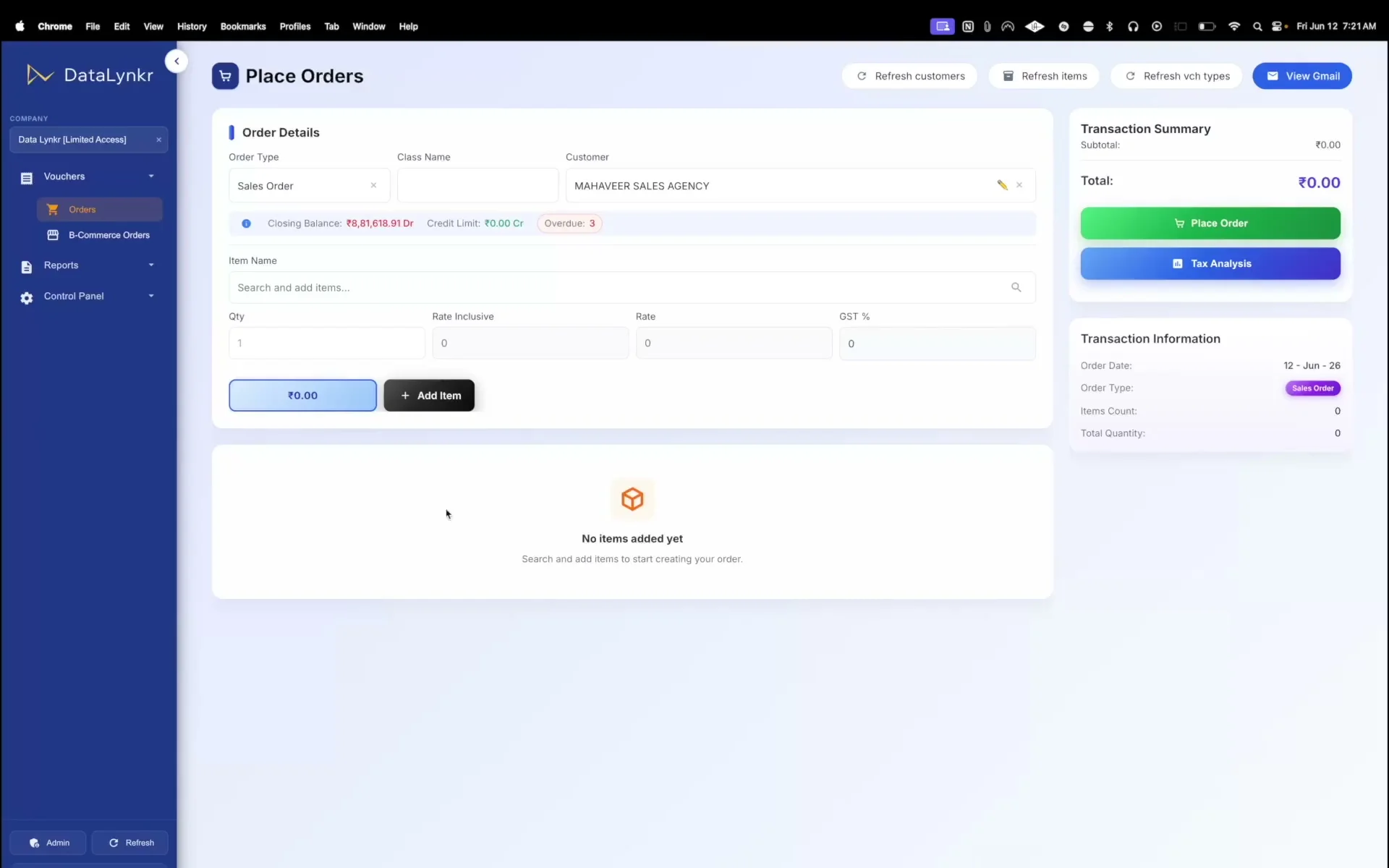
Place Orders
Submit orders directly through web or mobile interfaces. Orders drop into Tally instantly.
View Outstanding Balances
Provide instant, real-time visibility into pending payments, bills due, and overall credit limits.
Access Invoices & Receipts
Let customers retrieve and download copies of invoices, credit notes, and receipts at their convenience.
Track Orders
Provide step-by-step progress tracking of pending, confirmed, dispatched, and delivered orders.
Upload Attachments
Upload purchase orders, payment screenshots, or supporting documents directly to request tabs.
View Statements
Access complete client transaction histories, monthly ledgers, and formal statements of account.
Every Customer Sees Only Their Own Information
Each customer receives a personalized portal linked only to their account.
Client A Portal
Only Client A dataClient B Portal
Only Client B dataClient C Portal
Only Client C dataExperience the Transformation
Before DataLynkr
WhatsApp Orders
Orders arrive as unstructured text, voice notes, and images. Manual entry leads to typo errors.
Constant Enquiries
Customers call and message staff repeatedly checking order status, stock availability, and prices.
Manual Document Dispatch
Staff constantly export PDFs from Tally to email or WhatsApp invoice copies to customers manually.
Delayed Collections
Accounts teams waste days chasing overdue payments because customers claims they haven't received bills.
After DataLynkr
Self-Service Orders
Customers search the portal, see client-specific rates, and place error-free orders themselves.
Instant Information
Outstanding balances, order trackers, and real-time stock levels are instantly open to customers.
Always-On Document Access
Invoices, bills, receipts, and ledger statements are automatically accessible in their portal.
Faster Collections
Prompts show overdue bills right inside the dashboard, speeding up collections dramatically.

Always Open For Business
Your customers don't stop working when offices close.
Whether it's late at night, during weekends, or while systems are temporarily unavailable, customers can continue placing requests and transactions without waiting for a phone call, email, or manual intervention.
DataLynkr securely captures activity and automatically synchronizes it when systems become available again.
Because customer convenience shouldn't depend on office hours or connectivity.
24/7 Customer Access
Customers can place requests anytime.
Business Continuity
Transactions continue even during temporary disruptions.
Automatic Synchronization
Activity syncs automatically once systems reconnect.
Why Businesses Love It
DataLynkr unlocks operational efficiencies that save hours and drive business growth.
Fewer Calls
Reduce routine customer enquiries by making outstanding bills and order statements immediately self-service.
Faster Orders
Customers can place orders anytime, day or night. Avoid waiting for salespeople to pick up the phone.
Better Collections
With transparency over due dates and balances, collections happen faster with fewer payment disputes.
Stronger Relationships
Provide a modern customer experience that builds trust and sets your business apart from competition.
Better Data
Capture customer enquiries, purchase requests, and orders digitally. No handwritten notes lost.
Live Tally Integration
No duplicate portals or isolated databases. Data is stored directly within your trusted Tally ERP software.
Not Another Portal. A Secure Window Into Tally.
Traditional portals rely on complicated sync databases that easily break. DataLynkr interacts directly with Tally in real time.
Traditional Customer Portal
Fragile SetupProblems Encountered:
- cancel Sync Delays: Orders and statements are delayed pending scheduler runs.
- cancel Duplicate Data: Catalog and pricing exist in multiple databases, triggering mismatches.
- cancel Multiple Systems: Requires maintaining portal systems alongside your ERP.
- cancel Integration Maintenance: Custom middleware sync API breaks often.
DataLynkr Portal
Live WindowBenefits Gained:
- check_circle Live Information: Read inventory status and customer history directly from Tally.
- check_circle One Source of Truth: No duplicate records. Data is verified and stored in Tally.
- check_circle No Synchronization: Eliminates database syncing scripts completely.
- check_circle Instant Updates: Invoices raised in Tally appear in the portal instantly.
Turn Customer Calls Into
Customer Self-Service
Give customers instant access to the information they need while reducing workload on your sales and accounts teams.